The download finished. The model file is 5 GB, and your laptop has 8 GB of RAM. It should fit, right?
You press Enter. The fan roars, the cursor stutters, and the whole machine slows to a crawl.
The file size is only part of the story. Your operating system, your browser, and the model’s own active working memory all demand room too.
This guide explains the memory mechanics of local AI, shows the best models for 8GB, 16GB, and 32GB of RAM, and outlines the simple rules that keep your machine running smoothly instead of crashing.
| Your RAM | Aim For | Recommended Families |
|---|---|---|
| 8 GB | 3B to 8B models | Gemma 2 2B, Qwen 2.5 7B (Q4), Llama 3.1 8B, Granite 3.0 2B |
| 16 GB | 12B to 14B models | Gemma 2 9B/12B, Qwen 2.5 14B, or gpt-oss-20b (with apps closed) |
| 32 GB | 27B to 32B models | Qwen 2.5 32B, Gemma 2 27B, DeepSeek-R1 Distill 32B |
Want an exact VRAM breakdown for your specific GPU? Use our interactive VRAM Calculator or test your full rig with the AI Hardware Recommendation Engine.
How to Check Your RAM and VRAM
- Windows: Press Ctrl + Shift + Esc, open Task Manager, and check Performance → Memory. If you have an NVIDIA or AMD graphics card, check GPU → Dedicated GPU Memory (VRAM).
- Mac: Click the Apple menu, select About This Mac, and note your Unified Memory.
- Linux: Open a terminal and run
free -hornvidia-smi.
RAM vs. VRAM: If you have a discrete graphics card, its dedicated video memory (VRAM) sets the real speed boundary. On Apple Silicon (M1/M2/M3/M4), memory is unified between the CPU and GPU, so total system RAM is what counts.
The Memory Rule That Saves You Trouble
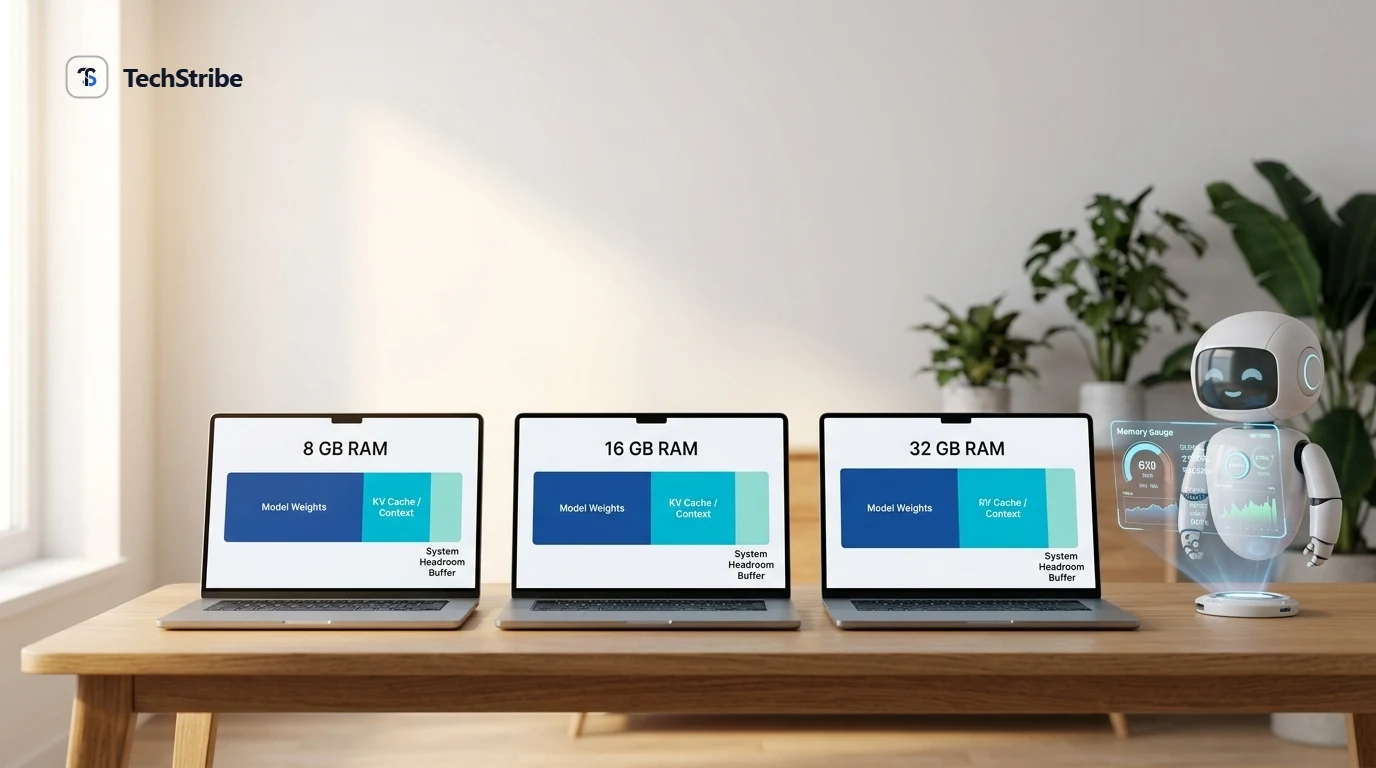
Across local AI testing, the model file should consume approximately 55% to 65% of your total RAM. The remaining memory is essential buffer for your operating system, active background applications, and the model’s KV cache (working memory):
| Total RAM | Max Model File Size | Left for System & Context |
|---|---|---|
| 8 GB | ~5.0 GB | ~3.0 GB buffer |
| 16 GB | ~9.5 GB | ~6.5 GB buffer |
| 32 GB | ~19.0 GB | ~13.0 GB buffer |
The longer your conversation or document, the more memory the Key-Value (KV) cache consumes. Raising a 27B model’s context window to 128K tokens can require up to 32 GB of memory on its own. On machines with limited RAM, keeping conversation context below 4K or 8K tokens prevents out-of-memory freezing.
Best LLMs for 8GB RAM
Eight gigabytes is the practical baseline for local AI. You stay within the 2B to 8B parameter range, accept shorter context windows, and close browser tabs before launching:
| Model | Type | Size at 4-Bit | Best Suited For |
|---|---|---|---|
| Qwen 2.5 7B (Q4) | General purpose | ~4.7 GB | Chat, summaries, basic coding |
| Llama 3.1 8B (Q4) | General purpose | ~4.9 GB | General writing and everyday prompts |
| Gemma 2 2B | Compact dense | ~1.6 GB | Ultra-fast summaries on budget laptops |
| Granite 3.0 2B | Compact, Apache 2.0 | ~1.5 GB | Lightweight tasks with zero system stutter |
The honest trade-off: shorter context windows and occasional hallucinations that larger 32B models avoid. For summarizing articles, drafting emails, and talking through bugs, an 8GB machine handles an 8B model well.
Best LLMs for 16GB RAM
Sixteen gigabytes is the sweet spot for modern laptops and midrange desktop GPUs. A 12B to 14B model delivers an immediate leap in reasoning, structured JSON output, and coding fidelity:
| Model | Type | Size at 4-Bit | Best Suited For |
|---|---|---|---|
| Qwen 2.5 14B | General purpose | ~9.0 GB | Daily programming with generous context headroom |
| Gemma 2 9B | High-density dense | ~5.8 GB | Superb prose and logical reasoning |
| Pixtral 12B | Multimodal vision | ~8.0 GB | Document OCR, chart analysis, and image prompts |
| gpt-oss-20b | Reasoning & tools | ~12.5 GB | Advanced tool-calling when background apps are closed |
Best LLMs for 32GB RAM
Thirty-two gigabytes unlocks the 27B to 32B tier, where local open-weights models approach commercial cloud API benchmarks:
| Model | Type | Size at 4-Bit | Best Suited For |
|---|---|---|---|
| Qwen 2.5 32B | General purpose | ~19.8 GB | Heavier reasoning, complex code generation, long context |
| Gemma 2 27B | General purpose | ~16.0 GB | High accuracy writing and analytical problem-solving |
| DeepSeek-R1 Distill 32B | Reasoning | ~19.8 GB | Mathematics, competitive coding, step-by-step logic |
| Command R (35B) | RAG & tool-calling | ~20.5 GB | Document citation generation and enterprise retrieval |
Side-by-Side Summary
| RAM | Model Size | Key Strength | Main Limit |
|---|---|---|---|
| 8 GB | 2B to 8B | Fast, lightweight, runs on almost any laptop | Strictly short context; less reasoning depth |
| 16 GB | 9B to 14B | Best balance of quality and system responsiveness | Tight if multitasking heavy IDEs and browser tabs |
| 32 GB | 27B to 35B | Near-frontier quality fully offline | Massive context windows still strain memory |
What You Can Realistically Do by RAM Tier
- 8 GB RAM: Summarize short articles, draft emails, explain code snippets, and brainstorm ideas without lag.
- 16 GB RAM: Draft long articles, refactor multi-file codebases, query multi-page PDFs with local RAG, and run autonomous agent tools.
- 32 GB RAM: Ingest entire code repositories, execute complex mathematical logic, keep 32K+ token context active, and run multimodal vision models.
Tips to Get More From Your RAM
- Close browser tabs: Chrome tabs easily consume 2 to 4 GB of RAM that your model could use.
- Default to 4-bit (Q4_K_M) quantization: 4-bit cuts memory footprint by over 60% with imperceptible loss in coherence.
- Limit context length in your runner: In Ollama or LM Studio, set
num_ctxto 4096 or 8192 unless you actively need large document ingestion. - Run one model at a time: Ensure background models are unloaded from memory before starting a new chat session.
- Always preserve 25% headroom: Operating systems use RAM for disk caching. When memory hits 100%, swap paging to SSD slows performance to a crawl.
Should You Upgrade Your RAM?
Moving from 8 GB to 16 GB makes the single largest difference for running local AI. Before purchasing an upgrade, verify whether your laptop memory is socketed (SO-DIMM) or soldered directly to the motherboard (common in ultra-thin laptops and MacBooks). If your RAM is soldered, sticking with compact 2B–7B models or utilizing our VRAM Calculator will help you pick the exact model your hardware can run comfortably.
Frequently Asked Questions
What is the best LLM for 8GB RAM?
A 4-bit quantized Qwen 2.5 7B or Llama 3.1 8B uses approximately 4.8 GB of memory, leaving sufficient room for your operating system.
Can I run an LLM on an 8GB laptop without a GPU?
Yes. Modern runners like Ollama compile efficient CPU instructions (AVX2/ARM NEON). While slower than GPU inference (expect 6 to 15 tokens per second), it is completely usable for reading and writing assistance.
Does RAM or VRAM matter more for local LLMs?
If you have a dedicated graphics card (NVIDIA/AMD), VRAM determines whether the model runs at blazing GPU speeds. On Apple Silicon, unified RAM is shared between CPU and GPU, making total system RAM the governing metric.
What is the best LLM for 16GB RAM?
Qwen 2.5 14B and Gemma 2 9B are the sweet spot, providing superior logic and coding capabilities while fitting well inside 16 GB memory.