
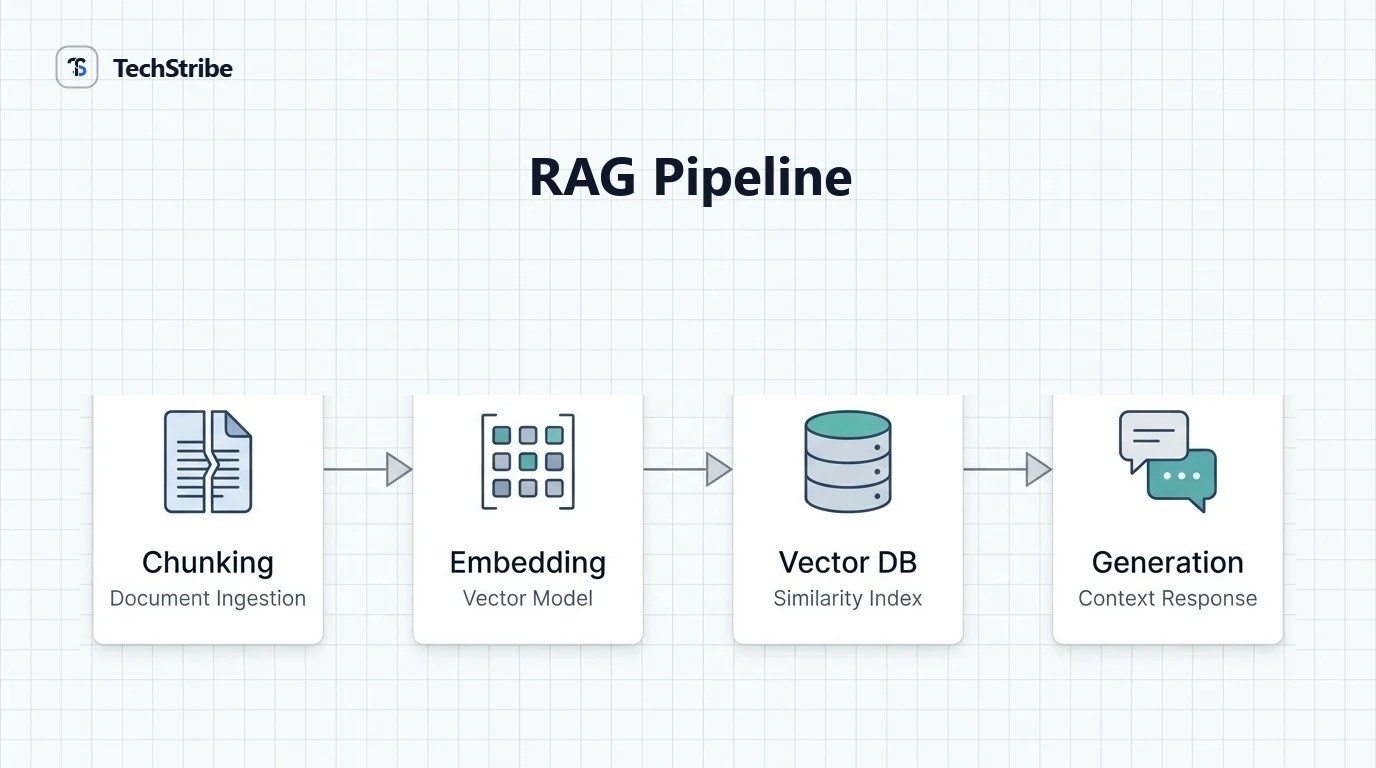
Friday afternoon. Your RAG demo is flawless. Five questions, five great answers, and the client is smiling. Monday morning. The client asks a sixth question, and the assistant confidently gets it wrong. Where did it break? Was it the documents, the way they were split, the search, or the model? If you cannot picture the pipeline, you are guessing. This guide gives you that picture. You will see each component, how the workflow runs from document to answer, and a simple map for finding what went wrong.
The Quick Answer
A RAG pipeline in one sentence A RAG pipeline is the chain of steps that turns your documents into grounded answers: prepare the content, find the relevant parts for each question, and let a language model write the reply. If you are new to the idea, start with our explainer on what retrieval-augmented generation is. This article goes one level deeper, into how the machinery fits together.
The Two Phases of a RAG Pipeline
Phase 1: Indexing. This happens ahead of time, and again whenever your documents change. 1 Load Collect the documents 2 Clean Remove clutter 3 Chunk Split into pieces 4 Embed Turn text into vectors 5 Store Save in a vector index Phase 2: Answering. This happens every time someone asks a question. 1 Embed Convert the question 2 Retrieve Find similar chunks 3 Rerank Sort by relevance 4 Prompt Add chunks to the question 5 Generate The model answers Think of it as building a library first, then using a librarian every time someone asks for help.
Every Component, at a Glance
Component What it does A common mistake Loader and parser Reads files such as PDFs, web pages, and documents Losing tables or headings in the process Component What it does A common mistake Cleaner Removes menus, duplicates, and junk text Skipping it, so noise gets indexed Chunker Splits text into pieces Cutting mid-idea, or making pieces too big Embedding model Turns text into vectors that capture meaning Using different models for documents and questions Vector store Saves vectors and finds the closest matches Forgetting to store source details Retriever Fetches the top matching chunks Fetching too few, or too many Reranker Re-sorts results by true relevance Leaving it out when quality matters Prompt builder Combines instructions, chunks, and the question Not telling the model to stick to the sources Generator The language model that writes the answer Trusting it without checking Evaluator Measures whether the pipeline works Testing only a few happy-path questions
The Five Decisions That Matter Most
1. Chunking Chunks are the unit your pipeline searches and reads. Too small, and each piece lacks context. Too large, and it buries the answer in noise. There is no universal best size, so test a few on your own documents. Splitting along natural boundaries, such as p aragraphs and headings, usually helps. 2. Embeddings The embedding model decides what "similar" means. Use the same model for your documents and your questions, or the comparison breaks. If your content is multilingual, check that your model handles those languages. 3. Retrieval Retrieval picks the top chunks, often called top-k. A larger k gives the model more material but also more noise, and it costs more. Start small and adjust based on tests. 4. Reranking A reranker takes the retrieved chunks and sorts them by how well they actually answer the question. It adds a little delay, but it often improves results. 5. Prompting Tell the model to answer only from the supplied text, to name its sources, and to say "I don't know" when the answer is missing. These instructions matter more than people expect.
Making Retrieval Better
Retrieval is where most pipelines win or lose. Three upgrades are worth knowing. Hybrid search: combine meaning-based search (embeddingswith keyword search, such as BM25. Embeddings catch similar ideas, and keywords catch exact terms, names, and codes. Metadata filters: store details such as date, product, or department with each chunk, so you can narrow the search. Contextual chunks: add a short note to each chunk explaining where it fits in the document, before you embed it. What the research says In Anthropic's own tests on its Contextual Retrieval method, adding context to chunks and combining embeddings with BM25 cut failed retrievals by 49%. Adding reranking brought the reduction to 67%. These are results from one company's evaluation, so treat them as a promising signal, not a guarantee for your data.
Where Pipelines Break
Symptom Likely stage What to try The answer is out of date Indexing Refresh the documents and re-index on a schedule The right fact exists but is missed Chunking or retrieval Change chunk size, add hybrid search The answer mixes unrelated topics Chunking or filters Split by structure, add metadata filters The model ignores the retrieved text Prompt or generator Tighten instructions, reduce noise, try another model Answers are slow Retrieval or generation Lower top-k, use a smaller model, cache results Users see documents they should not Access control Filter by permissions before retrieval This table is your answer to the Monday morning problem. Start at the symptom, find the stage, and fix one thing at a time.
How to Test Your Pipeline
You need to check two layers separately. Retrieval quality: did the system fetch the right chunks for each question? Answer quality: is the reply correct, complete, and faithful to those chunks? Build a small test set of 20 to 50 real questions with known answers, and run it after every change. When a score drops, you will know which change caused it. A warning about "it worked in the demo" A handful of friendly questions proves very little. Include awkward ones: vague wording, questions with no answer in the documents, and questions that need two sources.
A Simple Starter Pipeline
1. Choose one small, trusted set of documents. 2. Parse and clean them. Keep headings and source names. 3. Chunk by structure. Start with paragraph-sized pieces. 4. Embed and store. Use one embedding model and a vector database. 5. Retrieve the top few chunks. Add keyword search if exact terms matter. 6. Prompt carefully. Require sources, and allow "I don't know." 7. Test, then improve one part at a time. You can run the whole thing on your own machine for privacy. Our guide on what a local LLM is explains how.
Frequently Asked Questions
What is a RAG pipeline?
A RAG pipeline is the sequence of steps that turns documents into grounded answers: loading, chunking, embedding, storing, retrieving, and generating, often with reranking and evaluation.
What are the components of a RAG pipeline?
The main components are a loader, chunker, embedding model, vector store, retriever, optional reranker, prompt builder, language model, and an evaluation step.
What is the workflow of RAG step by step?
First, documents are cleaned, chunked, embedded, and stored. Then, for each question, the system embeds it, retrieves similar chunks, adds them to the prompt, and generates an answer.
What is chunking in RAG?
Chunking splits documents into small pieces for search and reading. Good chunks keep related ideas together, so retrieval finds complete, useful context.
What is reranking in RAG?
Reranking re-sorts the retrieved chunks by how well they answer the question. It often improves accuracy at the cost of a little extra time.
How do you evaluate a RAG pipeline?
Test retrieval and answers separately, using a set of real questions with known answers. Check whether the right chunks were found and whether the reply stays faithful to them.
What is hybrid search in RAG?
Hybrid search combines meaning-based search with keyword search. It finds both similar ideas and exact terms, which usually improves retrieval.