Two minutes before an important Friday presentation, an email hits your inbox from “IT Support.” It states urgently that your email account will be permanently deactivated within 24 hours unless you verify your password. The sender logo looks genuine. It addresses you by your real name. Your cursor hovers directly over the blue verification button. What you decide to do in the next three seconds is the difference between normal work and an enterprise data breach.
Most cyber attacks do not involve complex zero-day exploits or cinematic hacking techniques. They rely on catching an exhausted person who clicks an unexpected link or reuses a compromised password. The good news is that a small set of straightforward digital habits defends against over 90% of everyday threats. This beginner’s guide explains modern cybersecurity principles in plain language, without confusing technical jargon.
The Quick Answer
Cybersecurity in one sentence: Cybersecurity is the practice of safeguarding your devices, online accounts, private communications, and data from digital theft, malicious disruption, and unauthorized access.
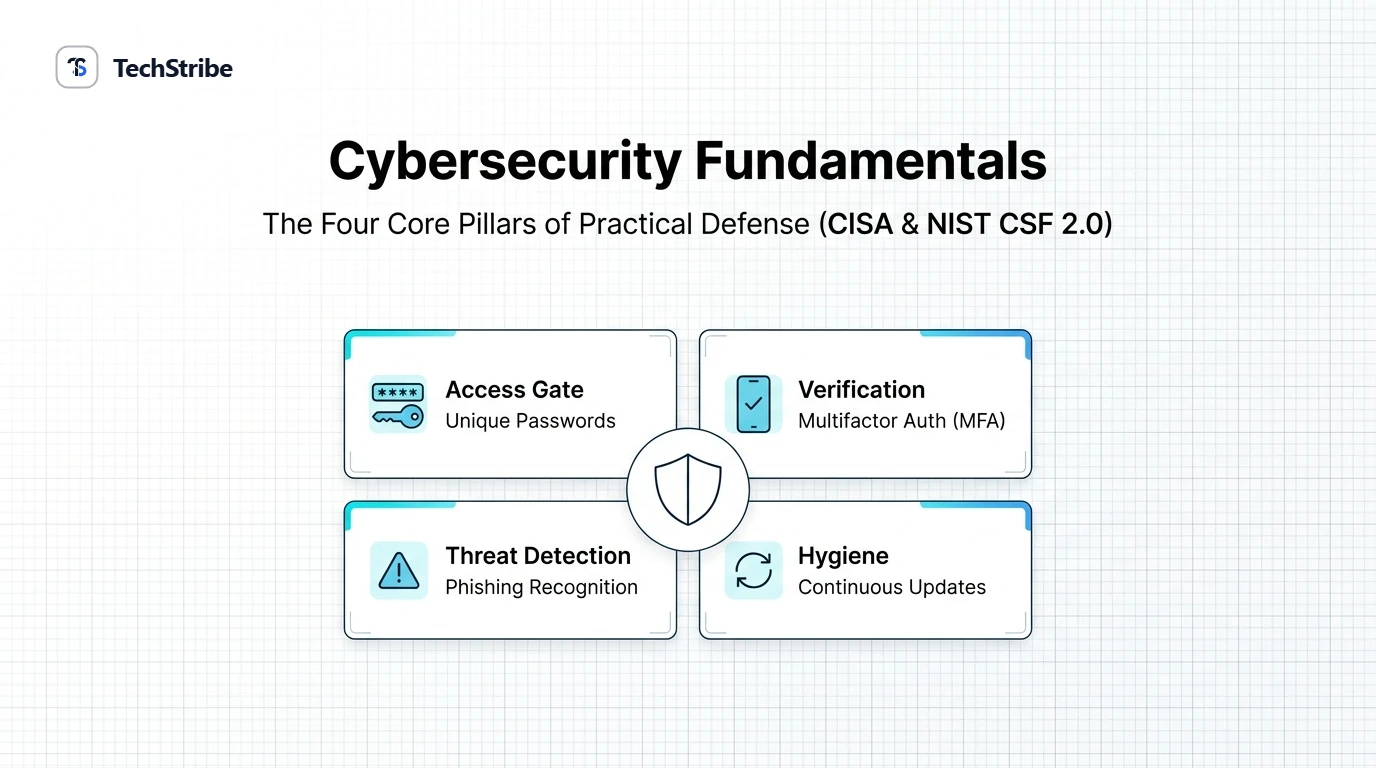
The 4 Essential Habits (CISA Secure Our World):
- Use strong, unique passwords: Long, randomized passphrases managed via a dedicated password manager.
- Enable Multifactor Authentication (MFA): Require a second proof of identity across every sensitive account.
- Recognize and report phishing: Pause before clicking urgent or unexpected links and attachments.
- Keep software updated: Turn on automatic updates across your operating system, browser, and hardware firmware.
What Cybersecurity Actually Protects: The CIA Triad
In professional security circles, all protective controls are designed around three fundamental objectives, known as the CIA Triad:
| Core Objective | What It Guarantees | Practical Real-World Example |
|---|---|---|
| Confidentiality | Ensures that sensitive information is accessible solely to authorized individuals. | A stranger or competitor cannot inspect your financial records, private emails, or patient health charts. |
| Integrity | Guarantees that data remains authentic, accurate, and completely unaltered by unauthorized parties. | An unauthorized attacker cannot quietly edit bank account routing numbers on vendor invoices before payment. |
| Availability | Assures that authorized users retain uninterrupted access to systems and services when required. | Your company website and customer databases remain fully operational and resilient against outages. |
Common Threats at a Glance
| Threat Type | Attack Mechanism | Primary Defense |
|---|---|---|
| Phishing | Deceptive emails, SMS messages, or fake websites designed to extract passwords or credit cards. | Sender domain verification, hovering links before clicking, and enabling hardware MFA keys. |
| Ransomware | Malicious software that quietly encrypts your documents and demands extortion payments for decryption keys. | Immutable offline backups following the 3-2-1 rule and restricting executable download permissions. |
| Credential Stuffing | Automated bots testing usernames and passwords leaked from past public corporate breaches. | Never reusing passwords across services; employing a reputable password manager. |
| Unpatched Vulnerabilities | Exploits targeting documented bugs in outdated web servers, operating systems, and browser extensions. | Enabling automated background security updates across all active software. |
Password Management: The Do’s and Don’ts
| Best Practices (Do) | Dangerous Habits (Don’t) |
|---|---|
| Generate random 16+ character passphrases or passwords using a password manager. | Reuse the same master password across your personal email, banking, and work accounts. |
| Store unique credentials inside an encrypted vault (1Password, Bitwarden). | Save passwords in unencrypted desktop notes, plain text files, or shared spreadsheets. |
| Enable app-based authenticator codes or FIDO2 hardware keys wherever available. | Rely solely on SMS text message codes if more secure app-based authentication is supported. |
Recognizing Phishing Red Flags
Before entering credentials or opening email attachments, inspect incoming communications for these standard deception patterns:
- Artificial Urgency & Threatening Tone: “Immediate suspension”, “Overdue invoice”, or “Your account has been flagged for legal action”. Attackers want you to act emotionally before critical thinking engages.
- Mismatched Sender Domains: The display name says “Google Support”, but the actual sender address resolves to
support-security@random-domain-xyz.com. - Discrepant Hyperlink Destinations: Hovering your mouse over a link reveals a destination URL completely unrelated to the authentic organization’s domain.
- Unexpected File Attachments: Receiving compressed archives (
.zip,.iso,.html) disguised as invoices or receipts.
A Security Framework for Teams: NIST CSF 2.0
For small businesses and growing technical teams, the National Institute of Standards and Technology (NIST) Cybersecurity Framework organizes practical security into six operational functions:
| Function | Guiding Question | Actionable Implementation |
|---|---|---|
| Govern | Who manages security policies and establishes organizational priorities? | Appoint a clear security lead and establish explicit acceptable use guidelines. |
| Identify | What physical devices, cloud assets, and private data must we defend? | Catalog all hardware, server endpoints, domains, and SaaS subscriptions. |
| Protect | What safeguards prevent or minimize attack impact? | Enforce universal MFA, centralized device encryption, and automated patching. |
| Detect | How will we discover an active anomaly or unauthorized login? | Configure login alerts, audit log aggregation, and monitor endpoint activity. |
| Respond | What procedures execute when a confirmed incident occurs? | Establish an emergency checklist: disconnect network cables, revoke tokens, notify affected parties. |
| Recover | How do we restore services and return to clean operations? | Restore systems from verified offline backups and conduct post-incident reviews. |
Frequently Asked Questions
What is the single most effective cybersecurity habit?
Enabling Multifactor Authentication (MFA) across your primary email and identity providers. Even if an attacker steals or guesses your password, they cannot access your account without the second verification factor.
Are password managers genuinely safe?
Yes. Industry-standard password managers (like Bitwarden and 1Password) use zero-knowledge, end-to-end encryption. The company cannot see your passwords. Using a password manager to generate distinct 20-character passwords is mathematically superior to human memorization.
What is the 3-2-1 backup rule?
Keep at least 3 total copies of your important data, across 2 different storage media types (such as an internal drive and an external hard drive), with 1 copy stored securely offsite or in cloud cold storage.
Is public Wi-Fi at coffee shops and airports dangerous?
While modern HTTPS encrypts most website traffic, open public Wi-Fi networks can expose DNS lookups and device discovery. Avoid accessing sensitive financial portals on untrusted networks, or utilize a reputable VPN connection.
What should I do immediately if I suspect my account has been hacked?
Immediately log in from a separate, clean device and change your master password. Select the option to “Log out of all other sessions” across all devices, verify that your recovery email and phone number have not been altered, and turn on MFA.