You ask your AI assistant, “What is blocking Friday’s production deployment?” It replies, politely and apologetically, that it cannot see your team’s issue tracker, your Git repository, or your staging logs. So you copy the error ticket, paste it into the chat window, copy a stack trace, paste that in, and copy the relevant configuration file. Within minutes, you have become nothing more than a human copy-paste courier.
What if your AI assistant could simply query those tools directly, securely, and strictly with your explicit permission? That is the exact challenge the Model Context Protocol (MCP) was designed to solve. This practical guide breaks down how MCP works, why it is rapidly becoming the universal standard for AI integration, and how you can start using it safely.
The Quick Answer
MCP in one sentence: Model Context Protocol (MCP) is an open-standard protocol introduced by Anthropic that allows AI applications to connect with external databases, code repositories, local filesystems, and developer tools using a uniform interface.
The USB-C analogy: Before USB-C, every smartphone, camera, and laptop needed a proprietary cable. MCP does the same for AI: instead of writing dozens of custom API plugins for every chatbot, developers build one MCP server that works across all MCP-compatible AI hosts.
Why MCP Exists: Before vs. With MCP
| Dimension | Before MCP (Legacy Plugins) | With Model Context Protocol |
|---|---|---|
| Tool Integration | Every AI assistant required custom, proprietary integrations and distinct wrapper libraries. | Developers build a single MCP server that functions identically across any compliant AI host. |
| Engineering Overhead | Massive duplication of effort maintaining custom plugins for ChatGPT, Claude, and local editors. | Write once, deploy everywhere across developer tools and autonomous agents. |
| User Experience | Inconsistent setup steps, divergent permission dialogues, and fragmented access tokens. | Standardized permissions, predictable human-in-the-loop approvals, and reusable workflows. |
How MCP Works: The Core Architecture
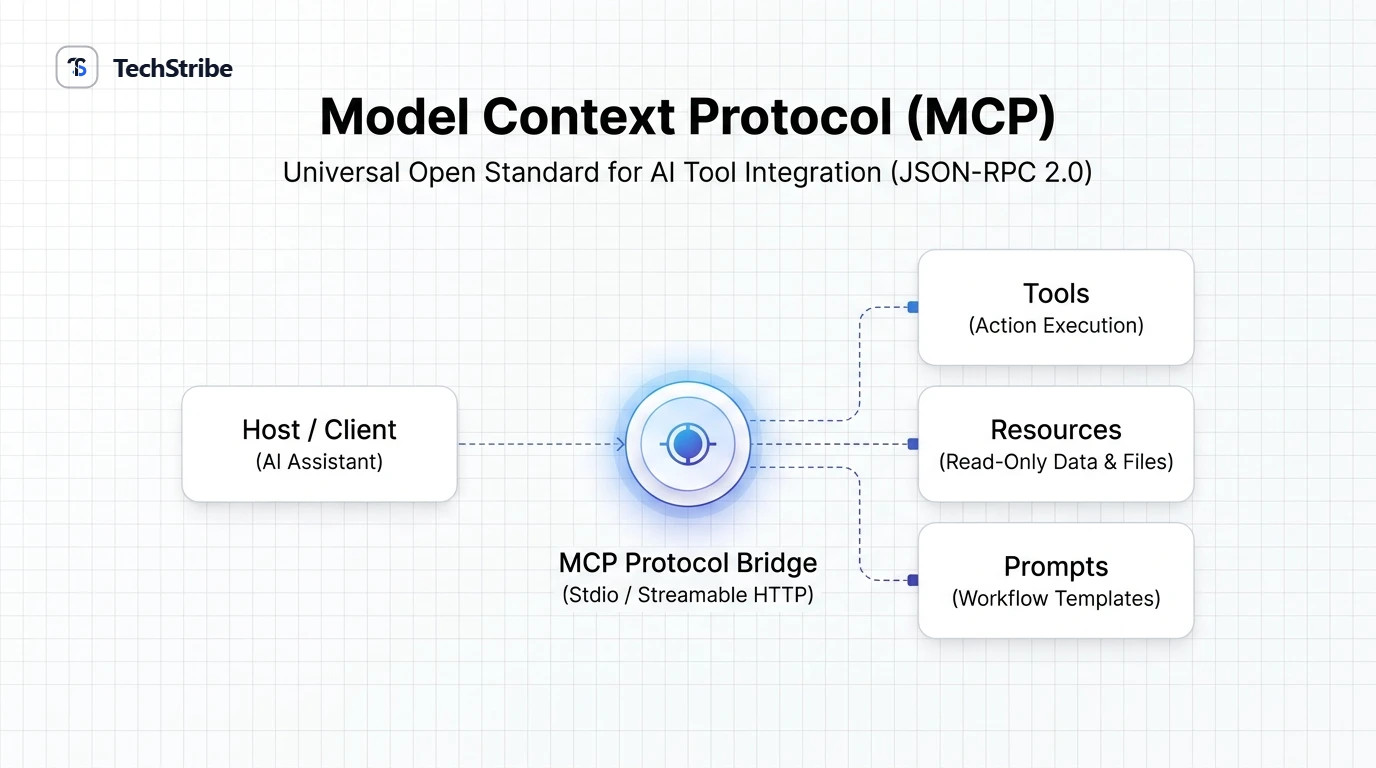
MCP operates on a clean client-server architecture utilizing the standardized JSON-RPC 2.0 protocol. The ecosystem consists of three distinct participants:
- Host: The root AI application you interact with (e.g., Claude Desktop, Cursor, Antigravity IDE, or custom developer dashboards).
- Client: An internal bridge within the host application that manages dedicated, one-to-one communication channels with specific servers.
- Server: A lightweight program that securely exposes local files, databases, APIs, or business tools through defined protocol primitives.
The Three Fundamental Building Blocks
| Primitive | What It Represents | Control Model | Practical Example |
|---|---|---|---|
| Tools | Executable functions that allow the AI model to perform actions and state changes. | Autonomous request by model, requiring explicit human consent. | Creating a GitHub pull request, running a SQL query, executing a test suite. |
| Resources | Read-only contextual data attached to conversations like files or live logs. | Managed directly by the host application without triggering mutations. | Loading an API schema, inspecting server metrics, reading database schemas. |
| Prompts | Pre-engineered, parameterized prompt templates surfaced directly in the UI. | Triggered intentionally by the human user. | “Debug production crash”, “Review code changes for security vulnerabilities”. |
Local vs. Remote MCP Servers
| Architecture | Local Servers (stdio) | Remote Servers (Streamable HTTP) |
|---|---|---|
| Execution Location | Runs directly on your local developer machine as a child process. | Hosted on remote cloud infrastructure, accessed across HTTPS. |
| Communication Channel | Standard Input / Output (stdio) | Server-Sent Events (SSE) / Streamable HTTP |
| Ideal Workload | Reading local project folders, querying local SQLite files, Git operations. | Shared enterprise databases, centralized CRM tools, team issue trackers. |
| Primary Security Focus | Local process execution permissions and filesystem path restriction. | API token hygiene, role-based access control, and encrypted transport. |
MCP vs. Traditional APIs and Plugins
| Concept | What It Is | How MCP Relates |
|---|---|---|
| REST / GraphQL API | A machine interface for software systems to exchange data. | MCP does not replace APIs. MCP wraps APIs in a standardized discovery layer designed specifically for LLM tool consumption. |
| Application Plugin | An extension module built tightly for one specific software product. | An MCP server is software-agnostic. It works identically in any host that implements the MCP specification. |
Security & Guardrails: How to Use MCP Safely
Because MCP servers have the ability to read private data and execute commands on your infrastructure, security hygiene is non-negotiable. Treat every MCP server with the same scrutiny you would give a junior developer with access keys:
- Verify Server Sources: Only install open-source or pre-built MCP servers from verified developers and official repositories.
- Principle of Least Privilege: Grant servers access only to specific working folders. If an assistant only needs to inspect data, mount the database with read-only database credentials.
- Enforce Human-in-the-Loop Confirmation: Keep execution confirmation dialogues enabled for tools that perform destructive state changes (e.g., deleting records, pushing Git commits, executing terminal commands).
- Protect Environment Keys: Never hardcode API keys into public configuration files; use local environment variables and secret stores.
Frequently Asked Questions
What does MCP stand for?
MCP stands for Model Context Protocol. It defines how artificial intelligence models discover, read context from, and execute actions across external software systems.
Who created the Model Context Protocol?
Anthropic open-sourced the Model Context Protocol specification and SDKs in late 2024. It has since evolved into an industry-wide open standard supported across major AI coding and productivity tools.
Does MCP replace standard REST APIs?
No. MCP sits on top of APIs. An MCP server typically makes calls to existing REST, GraphQL, or database endpoints under the hood, translating those capabilities into clean JSON-RPC primitives that AI models can reliably query.
Which applications support MCP today?
MCP is supported by Claude Desktop, Cursor, Antigravity IDE, Zed, Sourcegraph Cody, and a rapidly expanding ecosystem of autonomous coding agents and developer environments.
Can I write my own MCP server?
Yes. Official, production-ready SDKs are available in TypeScript, Python, Kotlin, and C#. A basic MCP server exposing local files or simple tools can be built in fewer than 50 lines of code.
Is running an MCP server safe?
MCP is designed with strict security primitives, but security ultimately depends on server permissions. Ensure servers use least-privilege credentials, keep approval prompts active for write operations, and avoid running unverified third-party binaries.