You spend an hour teaching an AI about your project. The next morning, you open a new chat session and it says, “Hi! How can I help you today?”
Everything you entered is gone.
That feels confusing, especially when providers advertise that their models support over one million tokens. So where did all of yesterday’s context disappear to?
The answer lies in the fundamental difference between AI memory and a context window. People often use these two terms interchangeably, but they represent entirely different architectural mechanisms. One defines what the model can actively see right now; the other determines what it can retain across sessions.
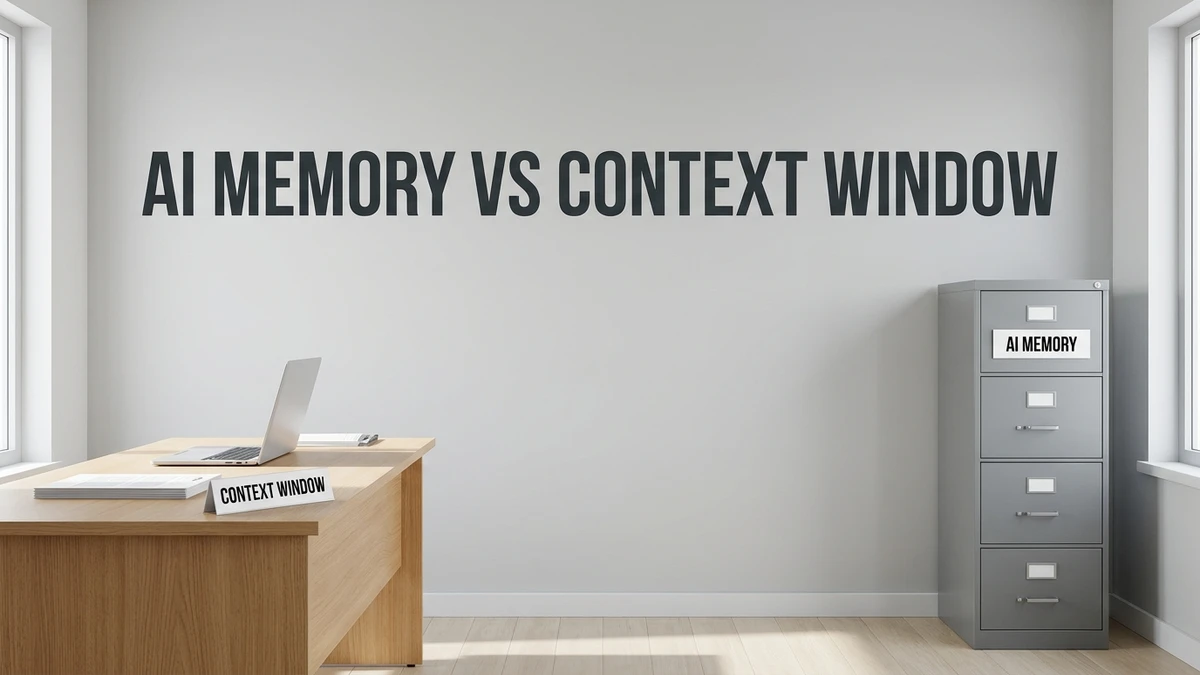
Quick answer: A context window in AI is the model’s short-term workspace. It holds everything the AI can see during a single active session. AI memory is saved information stored outside the chat in persistent storage and retrieved when relevant. Think of it like this: the context window is the desk, and AI memory is the filing cabinet next to it.
What Is a Context Window?
A context window is the total volume of text an AI model can process in a single request. Picture it as the surface area of the model’s physical desk. Whatever documents sit on the desk, the model can read. Anything not on the desk is completely invisible to it.
Context capacity is measured in tokens—small chunks of characters representing words or word fragments. In production architectures, every element of an interaction consumes space on that desk:
- Your prompt messages and questions
- The AI model’s generated replies
- Uploaded documents, PDFs, and spreadsheets
- System instructions, agent rules, and tool outputs
Modern models offer substantial context windows, reaching 128K, 200K, or 1M+ tokens. However, the window remains a finite workspace. When a conversation exceeds that capacity, older turns must be truncated or dropped from active view.
Key takeaway: The context window is strictly what the AI can see in the active prompt right now. It does not carry over when you open a clean session.
What Is AI Memory?
AI memory refers to structured information stored persistently outside the active chat session so the system can recall it in future interactions. If the context window is the desk, memory is the organized filing cabinet beside it.
An effective AI memory architecture performs three discrete functions:
- Extract: The system identifies enduring facts from your conversation, such as your professional role, coding guidelines, or project parameters.
- Store: It persists these facts in a database, vector index, or local markdown configuration file.
- Retrieve: When you start a future conversation, the system queries its storage and pulls relevant notes onto the active desk.
You can observe this pattern across modern AI systems:
- ChatGPT Memory: Automatically persists user preferences and background details across chats, allowing users to inspect or delete stored memories.
- Developer Memory Tools: File-based memory systems allow models to read and update external project logs outside the active prompt.
- Autonomous Coding Environments: Platforms use structured configuration files (such as
CLAUDE.mdorAGENT.md) to maintain codebase conventions across multiple developer sessions.
Important distinction: Memory does not replace the context window. Saved information must still be retrieved and loaded into the active window before the model can reason about it.
AI Memory vs Context Window: 7 Key Differences
Side-by-side architectural comparison:
| Comparison Dimension | Context Window | AI Memory |
|---|---|---|
| 1. Core Concept | What the model can actively see right now | What is saved in persistent storage for later |
| 2. Everyday Analogy | The surface of a work desk | A filing cabinet or database next to the desk |
| 3. Lifespan | A single request or ongoing chat thread | Persistent across multiple sessions and weeks |
| 4. Storage Location | Inside the active prompt payload | Outside the model, in databases or config files |
| 5. Capacity Limits | Fixed token budget set by model architecture | Virtually unlimited, though requires periodic curation |
| 6. Control Mechanism | Directly determined by what you paste or type | Managed by system rules and user settings |
| 7. Failure Mode | Fills up, causing truncation or “context rot” | Can accumulate outdated or conflicting facts |
Why a Bigger Context Window Is Not Memory
Having an enormous desk does not replace the need for an organized filing system. Expanding raw token capacity alone does not solve long-term retention for three reasons:
- Session resets: Starting a fresh session provides an entirely clean desk. Nothing persists unless a retrieval system injects it.
- Attention degradation (“Context Rot”): Research demonstrations, including the Stanford and UC Berkeley “Lost in the Middle” study, reveal that transformer models retrieve facts best at the beginning and end of long prompts. Storing thousands of irrelevant background facts inside the active prompt dilutes model focus and raises error rates.
- Inference cost and latency: AI APIs bill on every input token processed. Resending a massive conversation history on every single turn inflates operational costs and degrades token generation speed—pressuring hardware memory limits explored in our LLM quantization guide.
Simple rule of thumb: A large context window helps the AI read more at once. An AI memory system helps the AI remember you over time.
How Memory and Context Windows Work Together
Memory and context windows are complementary components rather than competing alternatives. Modern architectures combine both seamlessly:
- You provide key preferences during conversation (e.g., “Always write code in strict TypeScript.”).
- The memory subsystem indexes that rule into persistent storage.
- In a subsequent session, when you ask a coding question, the application executes a search query against its memory store.
- Relevant guidelines are retrieved via a RAG pipeline workflow.
- Only the targeted, relevant rules are injected into the active context window alongside your query.
This approach keeps the active prompt uncluttered while ensuring the AI retains critical project background.
Real-Life Examples
- Software engineering: Running a long multi-file code review in a single turn utilizes the context window. Storing team architecture patterns in a repository markdown file leverages persistent memory.
- Research & analysis: Ingesting a 50-page financial filing into an analytical session relies on the context window. Saving your corporate investment criteria across quarters relies on memory.
- Content creation: Pasting a competitor’s article for an on-page audit uses the context window. Preserving brand voice, formatting conventions, and target personas across drafts relies on memory.
Six Best Practices for Managing Context and Memory
- Start fresh sessions for distinct tasks: Prevent accumulated conversation drift from degrading response precision.
- Place critical instructions at the boundaries: Position paramount rules near the beginning or end of your prompt to counter “lost in the middle” attention drops.
- Curate inputs intentionally: Focused, concise prompts consistently outperform massive unedited data dumps.
- Store persistent guidelines once: Leverage system instructions or persistent project files for static preferences rather than retyping them each turn.
- Regularly prune memory entries: Periodically review stored notes and remove deprecated requirements or conflicting project rules.
- Avoid storing confidential secrets: Keep passwords, API tokens, and sensitive personal records out of persistent memory stores.
Related Reading & Deeper Context
- What Is a Context Window in AI? Tokens, Limits, and Effects — complete breakdown of token mechanics, input/output caps, and context rot.
- RAG Pipeline Explained: Components and Workflow — how retrieval architectures search knowledge bases and inject precise context into active prompts.
Frequently Asked Questions
Is AI memory the same as a context window?
No. A context window is the immediate workspace an AI sees during a single session, like a desk. AI memory consists of persistent data saved outside the chat that can be retrieved and loaded into future sessions when needed.
What is a context window in AI?
A context window represents the maximum token capacity a language model can process in one interaction, encompassing user input, system instructions, document attachments, and generated output.
Why does my AI forget what I said earlier?
The AI likely forgot because you started a new conversation thread, or because the active conversation exceeded the model’s context capacity, causing earlier turns to be truncated from active memory.
Does a bigger context window mean better memory?
No. A larger context window allows a model to read more text at one time, but it still resets completely upon starting a new session and can suffer from attention degradation when overfilled.
What is context rot?
Context rot refers to the documented decline in reasoning accuracy, instruction adherence, and fact recall that occurs as an AI model’s context window becomes crowded with high token volumes.
Can AI remember me between chats?
Yes, provided the platform includes an active memory subsystem or retrieval framework. Features like ChatGPT Memory or project instruction files persist user facts across multiple separate sessions.