You ask your company’s AI assistant, “What is our refund policy for annual plans?” It answers instantly and confidently. It is also wrong. The policy changed in March, and the assistant is working from memory that stopped updating long before. The AI was not lying. It simply could not look anything up. Now imagine the same assistant walking to the filing cabinet first, pulling out the current policy, and reading it before it replies. That small walk to the cabinet is the idea behind RAG. This guide explains how it works in plain language.
The Quick Answer
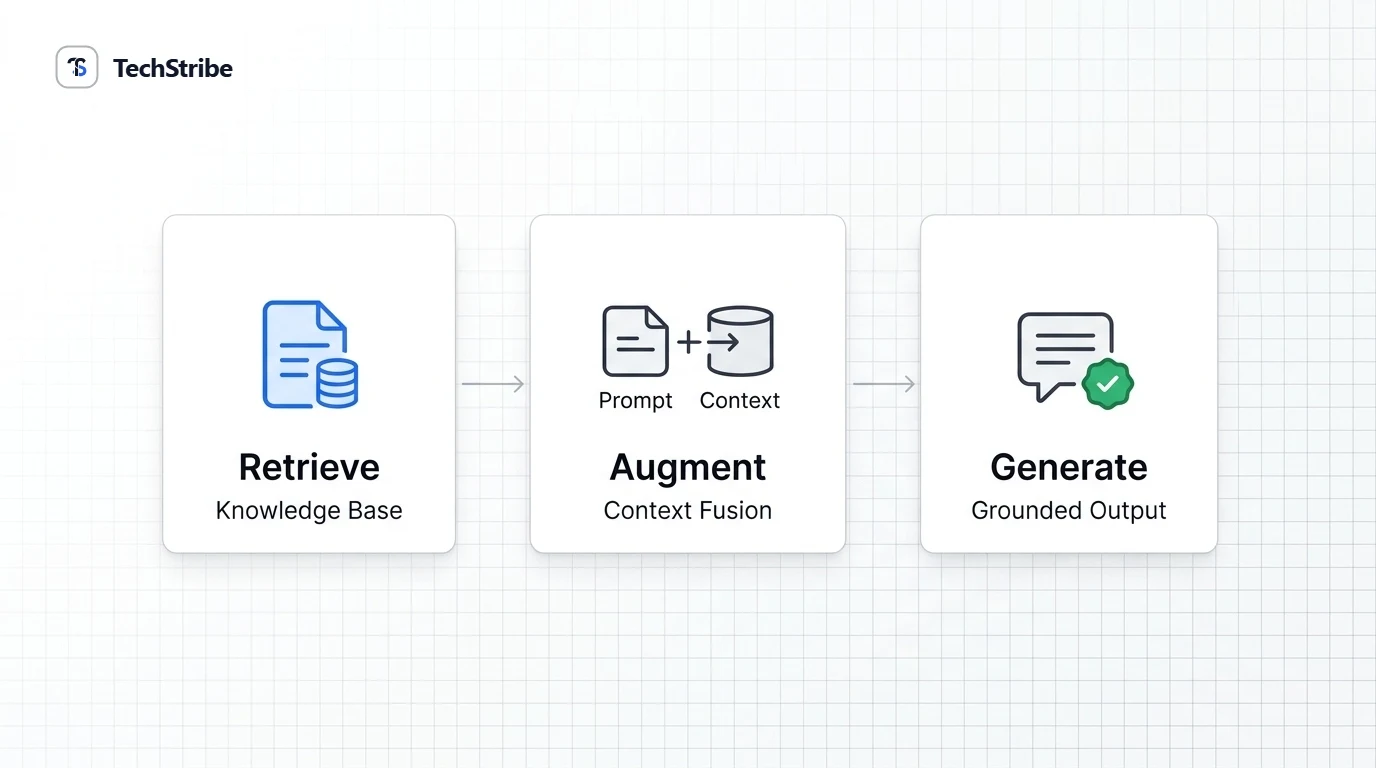
RAG in one sentence Retrieval-augmented generation (RAGis a technique where an AI model first retrieves relevant information from a source you choose, then uses it to write its answer. The name tells you the two halves: retrieval (finding the right information and generation (writing the replyou can think of it as an open-book exam for AI. The idea was introduced in a 2020 research paper led by Patrick Lewis and colleagues, and it has since become a common way to connect language models to outside knowledge.
Why RAG Exists
Language models are impressive, but they have three well-known gaps. RAG helps with each. The problem How RAG helps Knowledge gets outdated, because the model learned from data up to a cutoff It can fetch current documents at the moment of the question The model does not know your private data, such as company policies or product manuals You connect it to your own documents Models sometimes make up answers that sound right Grounding the answer in real text makes it more reliable and easier to check Notice the wording: more reliable, not perfectly reliable. RAG reduces errors but does not remove them, and we will come back to that.
How RAG Works, Step by Step
1 Prepare Split documents into chunks, then store them 2 Ask A user asks a question 3 Retrieve Find the most relevant chunks 4 Augment Add those chunks to the prompt 5 Generate The model writes the answer Step 1: Prepare. Your documents are cut into small pieces called chunks. Each chunk is turned into a list of numbers, called an embedding, that captures its meaning. These are stored in a vector database. Step 2: Ask. A user types a question. It is converted into an embedding using the same embedding model. Step 3: Retrieve. The system finds the chunks whose meaning is closest to the question. Step 4: Augment. Those chunks are added to the prompt, alongside the original question. Step 5: Generate. The language model writes an answer using the supplied text. An important detail The same embedding model must be used for the documents and for the question. Otherwise the numbers cannot be compared fairly, and retrieval gets worse.
RAG in Plain-English Terms
Term What it means Chunk A small piece of a document, such as a paragraph or a few sentences Embedding A list of numbers that represents the meaning of a piece of text Vector database A database that stores embeddings and finds the ones closest in meaning to a query Retriever The part that searches for the most relevant chunks Generator The language model that writes the final answer A simple example Say you build a help bot for a software product. 1. You load the product manual and FAQ pages into the system. 2. A customer asks, “How do I reset my password?” 3. The system retrieves the two chunks about password resets. 4. The model reads them and writes clear steps, based on that text. 5. If the manual changes next week, you update the documents. You do not retrain the model.
RAG vs Fine-Tuning vs Plain Prompting
Plain prompting RAG Fine-tuning What it does Uses the model as it is Adds outside facts at question time Retrains the model on new examples Best for General tasks Facts, documents, changing information Style, format, or specialised behaviour Updating knowledge Not possible Update the documents Needs retraining Effort to set up Lowest Moderate Highest Many teams start with RAG because building a document index is generally less demanding than fine-tuning a model. The two are not rivals. Some systems combine them.
Where RAG Is Used
Customer support: bots that answer from current help articles and policies. Internal knowledge search: ask questions across company documents, wikis, and files. Developer documentation: assistants that answer from API docs and code guides. Research assistance: tools that find and summarise sources, with a person checking the results. Website chat: site owners can let visitors ask questions answered from their own pages. Clear, current, well-structured content helps these systems find the right answer.
Where RAG Goes Wrong
RAG is not magic, and it does not solve every problem. Failure point What it looks like Poor source material Outdated or messy documents lead to outdated or messy answers Bad chunking Pieces are too small or cut in the wrong place, so key context is lost Retrieval misses The right chunk exists but is not found, so the model answers without it The model ignores the text It may still misread or overlook the supplied information Access and privacy The system may surface documents a user should not see The fix is testing. Ask real questions, check the answers against the sources, and keep a person involved for anything important.
Making RAG More Trustworthy
Show your sources. Let users see which documents an answer came from, so they can check it. Keep documents current. Remove outdated files, and re-index when content changes. Control access. Only retrieve documents that the person asking is allowed to see. Allow “I don’t know.” A good system says so when nothing relevant is found, instead of guessing. Review important answers. Keep a person in the loop for legal, medical, financial, or customer-facing replies.
How to Get Started
6. Start small. Choose a small set of trusted documents, such as one manual or policy. 7. Pick your parts. You need an embedding model, a vector database, and a language model. Many open-source options exist, and you can run them locally for privacy. 8. Build a simple pipeline. Chunk, embed, store, retrieve, and generate. 9. Test with real questions. Write twenty questions you already know the answers to, and check each reply. 10. Improve one thing at a time. Adjust chunk size, add better sources, or tune retrieval, then test again. If you want to run the model on your own computer, our guide on what a local LLM is is a good place to begin.
Related Reading & Deeper Context
- Llama vs Qwen vs Mistral — comparing the top three open LLM families across coding and efficiency.
- Model Context Protocol (MCP) — how MCP standardizes live tool and data connections for AI models.
- Llm-d 1.0 distributed inference routing — how production Kubernetes routing scales multi-tenant LLM traffic.
Frequently Asked Questions
What is RAG in AI?
RAG, or retrieval-augmented generation, is a technique where an AI model first retrieves relevant information from a chosen source, then uses it to write its answer.
What does RAG stand for?
RAG stands for retrieval-augmented generation. Retrieval means finding relevant information, and generation means the AI writing a response.
How does RAG work?
Documents are split into chunks and stored as embeddings. When a question arrives, the system finds the closest chunks, adds them to the prompt, and the model writes an answer from them.
Is RAG better than fine-tuning?
They solve different problems. RAG is usually better for facts and changing information, while fine-tuning suits style and specialised behaviour. Some systems use both.
Does RAG stop hallucinations?
It reduces them by grounding answers in real text, but it does not stop them completely. Models can still misread sources, and retrieval can miss the right information.
What is a vector database in RAG?
A vector database stores embeddings, which represent the meaning of text, and quickly finds the ones most similar to a question. RAG systems use it to retrieve relevant chunks.